
ChatGPT Zero to Hero · Episode 1
Discover 25 powerful techniques to get the most out of ChatGPT, from crafting better prompts to mastering system instructions.
Prompts and materials
Very powerful yet extremely vulnerable.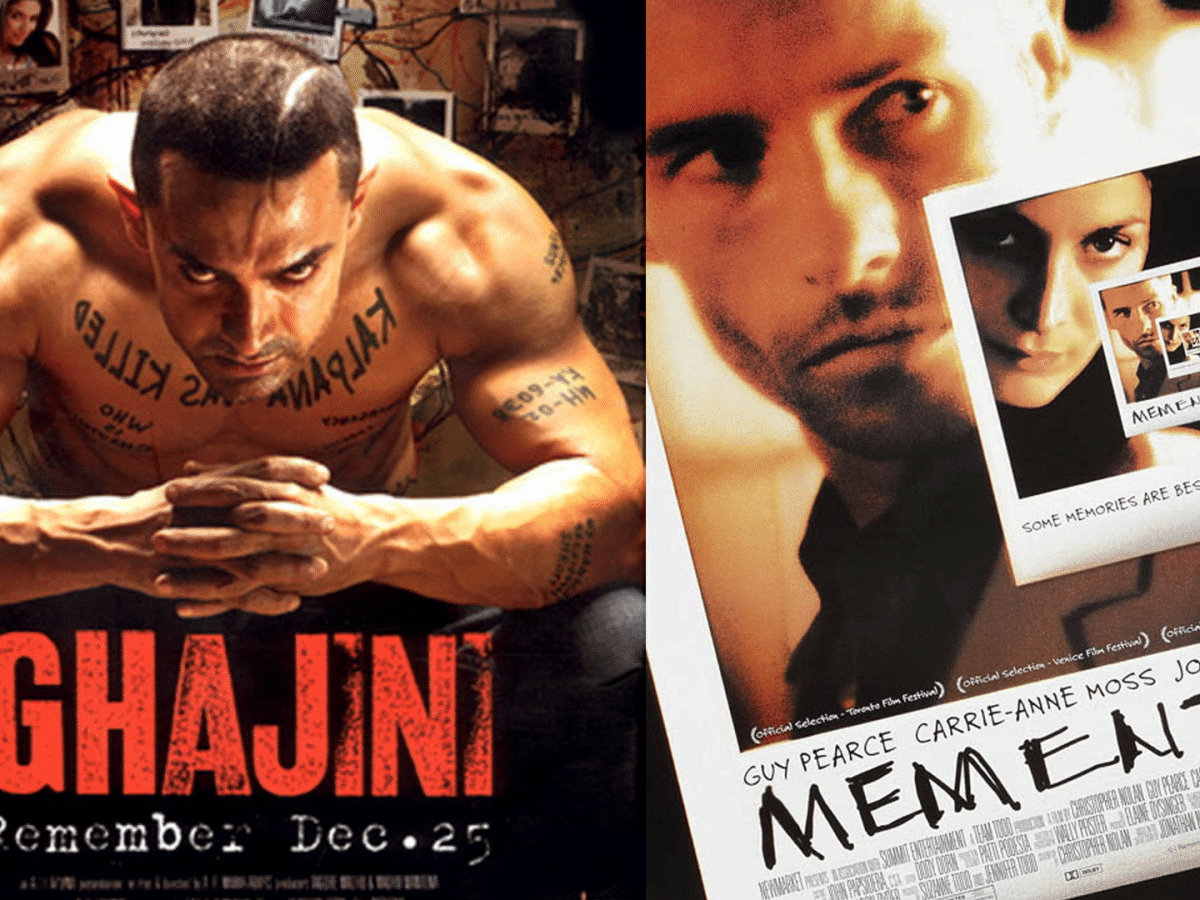
Meet Joe, who runs a small wellness studio in Bengaluru. Like in Ghajini/Memento, Joe learns to beat forgetfulness by building a system: clear notes (context), roles, goals, constraints, and reusable workflows.
For every you’ll get:
Q&A → Release pattern used throughout: Ask ChatGPT to first ask clarifying questions, then only release the final answer when you reply GO.
Watch the this part on YouTube
Concept: Every chat is a blank slate; add scene-setting.
Differentiator: Context turns generic output into your situation.
Try This (without tip):
Write a post about morning yoga.Try This (with tip):
I run a small wellness studio in Bengaluru. My audience is busy working professionals (25–40).
I want a short Instagram post about how morning yoga boosts energy before work — friendly and simple.
Before you write, ask 3 quick questions you need from me. Wait for my answers before writing.
Takeaway: Context is your first tattoo.
Concept: Role changes tone, logic, and focus.
Differentiator: Writing as Joe’s coach ≠ writing for Joe.
Try This:
You are a wellness coach for a neighbourhood yoga studio in Bengaluru.
Ask me up to 3 questions to tailor a 2‑line WhatsApp invite for our “Mindful Morning” session.
Only when I reply GO, release the final message.
Takeaway: Role = lens.
Concept: Tell ChatGPT what “done” looks like.
Differentiator: Prevents wandering; improves alignment.
Try This:
You are a wellness coach.
Goal: Encourage 9–5 professionals to try a 10‑minute morning routine.
Ask me 3 quick questions. After I reply GO, produce a 3‑line Instagram caption.
Takeaway: Goal = north star.
Concept: Boundaries boost clarity.
Differentiator: Predictable length/tone/format.
Try This:
Write a WhatsApp invite for a free meditation class.
Constraints: ≤ 40 words, Hinglish, warm tone, ends with a friendly CTA.
Ask 2 questions first; release final only when I say GO.
Takeaway: Constraints = discipline.
Concept: Explore, compare, choose.
Differentiator: You see patterns across options.
Try This:
Give me 3 Instagram hooks for a weekend yoga workshop. Rank by likely engagement.
Ask 2 questions first; release final options after I say GO.
Takeaway: Options reveal what “good” looks like.
Watch the this part on YouTube
Concept: Create your own memory.
Try This:
Summarize this chat in 5 bullets I can paste at the top of our next chat. Use neutral tone.Takeaway: Copy summaries into a notes doc.
Concept: Organized threads simulate memory.
Try This:
We’re starting a “Yoga Marketing” project thread.
Create a reusable header I can paste into future chats with: Audience, Brand voice, Content pillars (Energy • Calm • Community).
Ask me 3 questions to finalize; release the header on GO.
Takeaway: Folders = focus.
Watch the this part on YouTube
Try This:
Improve this caption but keep my casual voice.
Keep emojis light. Max 40 words. Ask 1 question; release on GO.
when asks for your caption provide this:
Just finished another yoga class.Takeaway: Preserve Joe’s personality.
Try This:
Match the tone of below lines when rewriting my caption :
“Our mornings begin with calm breaths and gratitude — a soft reminder to slow down, connect inward, and welcome the day with ease.”Here is my caption: "Radiate positivity, inside and out. Your journey to wellness starts now."Takeaway: Examples teach tone faster than adjectives.
Try This:
Explain the benefits of yoga to first‑time college students in India — light, friendly, no jargon. 3 sentences.
Ask 1 question; release on GO.
Takeaway: Audience defines rhythm.
Try This:
Example 1: Breathe → Reset your mind.
Example 2: Stretch → Wake your body.
Continue with 3 similar lines. Ask 1 question; release on GO.
Takeaway: Show, don’t tell.
Watch the this part on YouTube
Each “data” tip includes a self-contained asset (table) you can paste directly.
Try This:
Month,Clients
Jan,32
Feb,48
Mar,41
Apr,52

Use the table above. What’s the month‑over‑month trend? Keep to 2 bullets.
Takeaway: GPT reads small CSVs well.
Asset: (reuse the table above)
Try This:
From the clients table, find 2 patterns and 1 anomaly. One‑line explanation each.Takeaway: Ask for analysis, not summaries.
Asset: (reuse the table above)
Try This:
Describe how a bar chart of Month vs Clients would look. Mention tallest/shortest bars and overall shape in ≤ 3 lines.Takeaway: Verbal visualization helps non-designers.
Describe this as a bar chart comparing months and sales.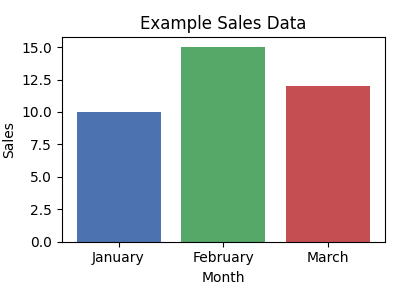
Watch the this part on YouTube
Free plans may not browse. These prompts work even without browsing by asking for Q&A first and allowing you to paste links if needed.
Concept: Joe wants a crisp weekly news snapshot.
Try This:
Curate Content
Topic: Wellness & Yoga in India. Region focus: India. Window: last 7 days.
Output spec:
- 5 bullets max (≤ 20 words each)
- Include source name and date in brackets
- One‑line “Why this matters” at the end
Takeaway: Structure > length.
Concept: Joe wants a crisp weekly news snapshotv.
Try This:
Curate Content
Topic: Wellness & Yoga in India. Region focus: India. Window: last 7 days.
Output spec:
```
**Headline:** <headline>
**Source / Date:** <source>, <date>
**Link:** <url>
**Quick Summary:** <2 sentences>
**Takeaway:** <short punch-line>
**Discussion topics:** <one bullet, max 20 words>
```
Takeaway: Turn paste-ups into insights.
Try This:
Turn my last 5 successful prompts into reusable templates with placeholders like {audience}, {tone}, {length}. Name each template.Takeaway: Prompts are assets.
Watch the this part on YouTube
Try This:
Notes: Plan June promo. Need budget. Assign reels. Book community class venue.

Turn the notes above into action items. Start each with a verb. Group by owner: Joe • Team • Vendor. ≤ 6 bullets.
Takeaway: Clarity beats clutter.
Asset (messy email):
hey team, project is behind, pls hurry or we’re in troubleTry This:
Asset (messy email):
hey team, project is behind, pls hurry or we’re in trouble

Do this:
Rewrite the email to be polite but assertive. Keep it under 70 words.
Takeaway: Tone = trust.
Try This:
Give 5 caption options for International Yoga Day. Rank by clarity. Add 1 hashtag per option. Takeaway: Choice with guidance.
Watch the this part on YouTube
Concept: Quick intents with slash-style cues.
Differentiator: Speed up common tasks. (Use as plain text if your UI doesn’t support /.)
Takeaway: Use ChatgPT’s global slash cues to do things quickly.
Concept: Quick intents specific for your needs with slash-style cues.
Differentiator: Speed up common tasks. (Use as plain text if your UI doesn’t support /.)
Creat a Local Cue:
Slash cues:
/caption → Write an Instagram caption in a friendly, local tone.
    Input: topic or theme
    Output: 1–2 short lines with emojis + CTA.

Examples:
    /caption morning yoga
    → "☀️ Rise, stretch, smile — your day starts here. #MorningYoga #BreatheEasy"
Use the cue:
/caption evening meditationTakeaway: Create a mini legend at the top of threads.
Try This:
Summarize today’s chat in 5 bullets with:
- What we decided • What’s pending • Next prompt to paste
Neutral tone. Ready to reuse.
Takeaway: Every session deserves a memory.
Concept: Memory fades; systems last.
Try This (Joe’s System Checklist):
Takeaway: Joe doesn’t need a perfect memory, he needs a perfect system.
Joe built a lightweight system that makes ChatGPT reliable, fast, and personal, without agents or fancy extras. Episode 2 will expand this into power features, but for now, Joe’s studio runs smoother than ever.
| 1, Give Context (The Ghajini Rule)
2, Give an Identity
3, Define Success
4, Add Constraints
5, Ask for Numbered Options
6, Carry Memory Forward
7, Project Folders
8, Editing in My Voice
9, Match Tone by Example
10, Add Audience Cues
11, Few-Shot Prompting
12, Paste Small Tables as Text
13, Ask for Patterns & Anomalies.. | 14, Describe Visuals in Words
15, Ask for chart descriptions
16, Latest-7 day News Miner
17, Structured Data Miner
18, Create a Prompt Vault
19, Meeting-to-Actions Converter
20, Polite but Assertive Email Rewrite
21, Caption Factory (Ranked Options)
22, Global Shortcut Commands
23, Local Shortcut Commands
24, End with a Reusable Summary
25, The Final Ghajini Rule: System Over Memory |
|,,,,,,,,,,,,,,,,,,,,,,,,,,,,,,,,,,,,,,,,,,,,,,,,,,,,,,,,,,,,,,,,,,,,,,,,,,,,,,,,,,,,,,,,,,,,,,,,,,,,,,,,,,,,,,,,,,,,,,,,,,,,,,,,,,,,,,,,,,,,,,,,,,, - |,,,,,,,,,,,,,,,,,,,,,,,,,,,,,,,,,,,,,,,,,,,,,,,,,,,,,,,,,,,,,,,,,,,,,,,,,,,,,,,,,,,,,,,,,,,,,,,,,,,,,,,,,,,,,,,,,,,,,,,,,,,,,,,,,,,,,,,,,,,,,,,,,,,,,,,,,,,, |